
Integrate comprehensive maps in seconds
Quickly and easily integrate fresh maps and location features into your application.
HERE Maps API for JavaScript brings interactivity and rapid customization into your application development, with HERE maps as the foundation. Explore a growing database of 58 million mapped roads and 5 million map changes per day.
Whether you’re creating a consumer app that delivers accurate routing or a commercial fleet app that highlights road conditions, HERE Maps for JavaScript API supports many use cases, dev environments and browsers.
The API-driven architecture makes it easy to test and maintain code development while integrating only the features you need into the application environment.
Code samples
Features and capabilities
| Feature | Description |
|---|---|
| Personalization | Perform run-time modifications of map styles and property settings, such as color, width, label size and zoom level. |
| Interactivity | Take advantage of pre-built and customizable UI elements that enable users to zoom, pan, scale, choose map type and more. |
| Map and satellite tiles | Integrate professionally designed, pre-rendered map tiles in a variety of styles, including transit, fleet, base, traffic and hybrid, to get to market faster. |
| Car and pedestrian routing | Provide turn-by-turn instructions for driving and walking in over 108 different languages. Let users set their own preferences, such as shortest and fastest routes, as well as restrictions like tolls and highways. |
| Geocoding | Turn addresses into geocoordinates and vice versa. Get accurate matches with over 360 million precise point addresses in 108 countries. |
| Places information | Make it easy for users to search, explore and interact with points of interest. Access 150 million named and categorized places in over 190 countries across the world. |
| Real-time and historical traffic | Add real-world context to your application by integrating real-time and historical traffic information about accidents, congestion, construction and more. |
| Custom locations | Store custom POIs or other data types with lat/long, shapes and geometries, and layers. Add your own POIs or shapes onto the map for visualization purposes (such as warehouses, truck shops, retail stores and offices). |
| Advanced data sets | Code with data sets that include speed limits for trucks, road inclines, road curvatures, lane dividers, lane markings, junction visuals, census boundaries, demographic data and more. |
| Geofencing | Monitor mobile assets entering or leaving a certain geographic area. Customize the search radius around a position for triggered alerts. |
| Map drawing | Add multiple overlays for points, lines or areas with standard markers, DOM markers, clustering, geoshapes and meta information boxes that can be easily created from geographic coordinates. Import KML, GeoJSON and WKT data sets. |
| Data display | Show value-based and density-based heat maps as colored map overlays to visualize the intensity of your data at specific geographic locations. |
Product demo
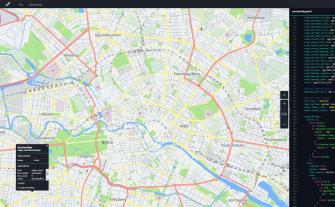
Map Customization Tool
The Map Customization Tool is a text based map editing tool to customize the appearance of the map you are using in conjunction with the HERE Maps...
Connect with HERE Developers


